Table of Contents
Automation is no longer a “nice to have” in vacation rental management; it’s becoming a necessity. As portfolios grow and guest expectations rise, property managers need smarter ways to operate efficiently while maintaining high service standards.
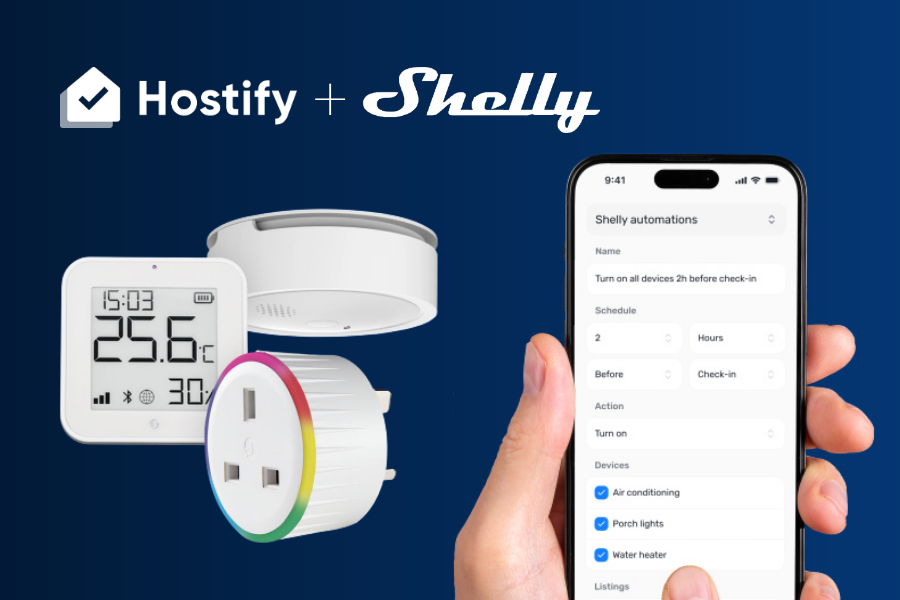
This is where the new Hostify and Shelly integration, a leading smart home automation platform, comes into play. Together, they enable property managers to connect reservations with real-world actions, transforming how properties are managed, accessed, and maintained.
Smart home technologies are no longer a niche innovation. They are rapidly becoming a central component of modern energy systems, digital infrastructure, and building efficiency strategies. Studies show that adoption is accelerating globally, with millions of smart homes already in use and strong growth projected across Europe and North America, driven by demand for automation, energy optimization, and connected living experiences.
By combining operational data with smart device control, Hostify and Shelly help operators reduce manual work, improve guest experience, and scale their business with greater consistency, while aligning with the broader shift toward more intelligent, efficient, and responsive properties.
What is the Hostify + Shelly Integration?
The Hostify + Shelly integration connects your reservation system with your smart property devices.
Hostify acts as the central system for managing reservations, availability, and operations, while Shelly focuses on helping customers make eco‑conscious choices by providing data‑powered tools to track and manage energy consumption, enabling control over devices such as lights, thermostats, and other connected equipment.
When a reservation is created or updated in Hostify, it can trigger automated actions in Shelly, such as granting access, preparing the property, or adjusting device settings.
This creates a seamless connection between digital bookings and physical property operations.
How the Integration Works
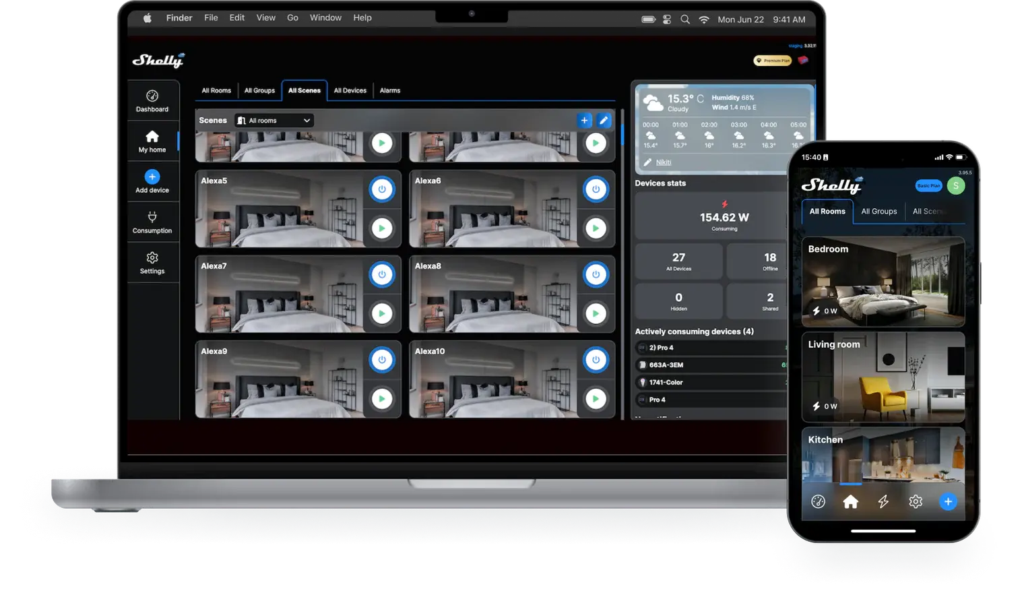
With the Hostify + Shelly integration, property managers can connect their Shelly Cloud account to Hostify and access all their compatible devices in one place, by linking reservation events in Hostify with automation rules in Shelly. Property managers can create automations that run on reservation schedules or other conditions. Notifications can be configured to alert hosts when sensors detect activity, and the Shelly BLU Button can trigger device actions, messages or even Asana tasks.
For example:
- A new booking triggers check-in access for the guest
- Check-in time activates smart devices (lights, heating, etc.)
- Check-out time resets the property for the next stay
These automations ensure that properties respond automatically to occupancy changes, reducing the need for manual intervention.
Key Features of the Integration
Smart Access with Automated Entry
Enable keyless check-ins by connecting smart locks to reservation data. Guests receive access automatically based on their booking details.
Remote Device Control
Control lighting, heating, air conditioning, and appliances remotely through Shelly devices, improving both efficiency and guest comfort.
Occupancy-Based Automation
Devices can be programmed to react to occupancy status, ensuring that properties operate only when needed.
Property Preparation & Reset
Automate pre-arrival preparation and post-departure resets, ensuring each guest enters a ready-to-use property.
Real Use Cases & Examples
1. Automated Guest Arrival Experience
When a guest’s check-in time arrives, the system can:
- Unlock the door via a smart lock
- Turn on lights
- Adjust temperature settings
This creates a seamless, contactless arrival experience.
2. Energy Optimization During Vacancies
When a property is unoccupied:
- Heating or cooling systems can be turned off or reduced
- Lights and appliances are switched off automatically
This helps reduce unnecessary energy consumption and operational costs.
3. Multi-Unit Building Management
For operators managing entire buildings:
- Automation rules can be applied across multiple units
- Devices across properties can be controlled centrally
- Consistent standards can be maintained at scale
4. Efficient Turnover Between Stays
After checkout:
- Devices are reset automatically
- Temperature and lighting are adjusted
- The property is prepared for cleaning, and the next guest
5. Remote Portfolio Management
Operators managing properties across different locations can oversee operations without being physically present, ensuring consistency across the entire portfolio.
Key Features of the Integration
Smart Access with Automated Entry
Enable keyless check-ins by connecting smart locks to reservation data. Guests receive access automatically based on their booking details.
Remote Device Control
Control lighting, heating, air conditioning, and appliances remotely through Shelly devices, improving both efficiency and guest comfort.
Occupancy-Based Automation
Devices can be programmed to react to occupancy status, ensuring that properties operate only when needed.
Property Preparation & Reset
Automate pre-arrival preparation and post-departure resets, ensuring each guest enters a ready-to-use property.
Benefits for Property Managers
- Centralized device control: Manage all your Shelly smart switches, sensors, thermostats, and buttons from within Hostify – no need to juggle separate apps or dashboards.
- Reservation-based automation: Automatically trigger device actions at check-in and check-out, ensuring a consistent and professional guest experience every time.
- Real-time alerts and notifications: Get instant alerts when motion is detected during vacant periods, helping you respond quickly to unexpected activity at your properties.
- Reliable, open ecosystem: Shelly devices support local control and open APIs, so your automations keep running reliably even when internet connectivity is interrupted.
- Reduced Manual Work: Automating repetitive tasks such as access management and property setup significantly reduces operational workload.
- Improved Guest Experience: Guests benefit from smooth, contactless check-ins and a more comfortable, well-prepared environment.
- Lower Operational Costs: Energy optimization and efficient workflows help reduce expenses across the portfolio.
Why Combine Smart Home Technology with Hostify?
Hostify serves as the operational backbone of your business, managing reservations, availability, and guest communication.
Shelly complements this by handling the physical layer of property operations, executing actions based on reservation data.
Together, they bridge the gap between software and physical infrastructure, allowing property managers to run smarter, more automated operations.
Beyond operational efficiency, smart home technologies are increasingly recognized for their ability to optimize energy usage, improve security, and enhance convenience. Research shows that these technologies enable users to monitor and control energy consumption more effectively, contributing to more sustainable household behavior and reduced environmental impact.
By combining Hostify’s centralized control with Shelly’s real-time device automation, property managers can not only streamline operations but also meet growing expectations for smarter, more energy-efficient rental experiences.
How to Get Started
Getting started with Hostify + Shelly integration is simple and structured:
Connect Your Accounts
- Go to the Apps section in your Hostify account
- Select the Shelly integration
- Log in with your Shelly Cloud account
Enable and Select Devices
- View all available Shelly devices after login
- Select the devices you want to manage
- Enable integration and device control permissions
- Save your settings
Important: Only devices where you are the owner and administrator will appear.
Assign Devices to Listings
- Go to the Devices tab in Hostify
- Choose the listing where the device is installed
- Assign one or multiple devices to each listing
- Add labels if needed for easier management
Create Automations
- Go to the Shelly Automations tab
- Click Add New
- Define the automation name and schedule
- Select the devices involved
Set Triggers and Actions
- Choose conditions based on reservation events
- Example: before check-in, after check-out, or no active booking
- Define actions such as turning devices on or off
Add Notifications and Workflows
- Create alerts for hosts or teams
- Example: motion detected without a reservation
- Trigger operational actions like marking a unit as cleaned or checked out
Test and Scale
- Test automations to ensure everything works correctly
- Start with key use cases like smart access or energy control
- Expand automation across your properties as you grow\
Conclusion
As the vacation rental industry continues to evolve, automation and smart property management are becoming key differentiators.
The Hostify + Shelly integration empowers property managers to:
- Automate operations
- Enhance guest experiences
- Optimize energy usage
- Scale efficiently
Are you ready to take your business to the next level?
By connecting reservations with smart devices, operators can move toward a more connected, responsive, and scalable way of managing properties efficiently.