
Get a clearer view of your Booking.com listings without leaving Hostify.
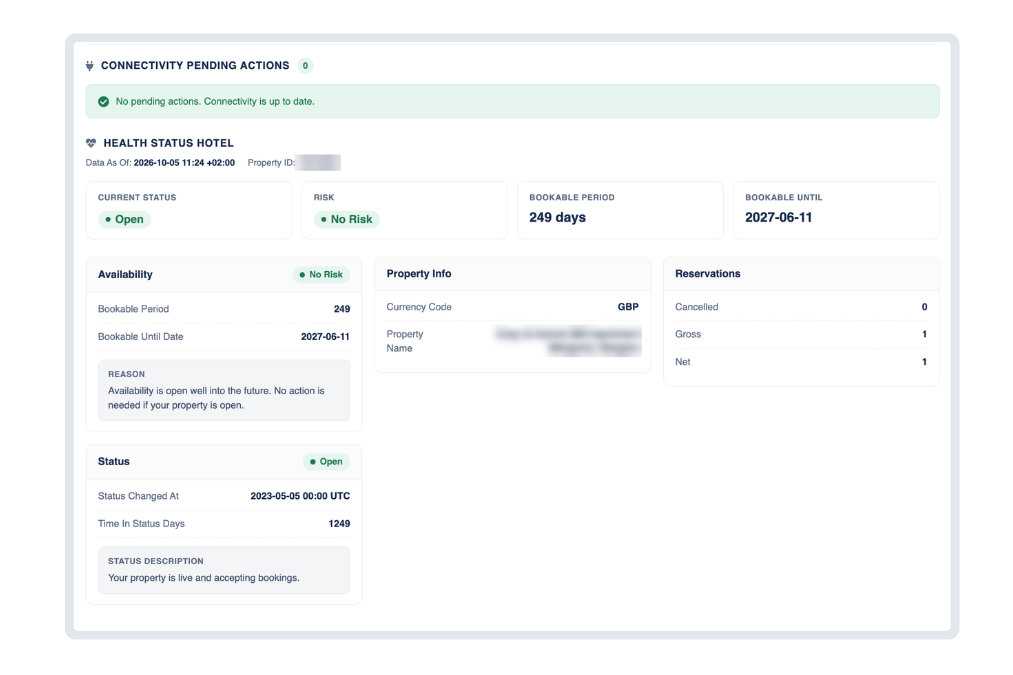
We’ve introduced a new Health Status tab for Booking.com single units, bringing key information directly from the Booking.com channel into Hostify.
More Visibility, Fewer Checks
Instead of switching between platforms to understand how your Booking.com listing is performing, you can now access the most important health and connectivity information directly in Hostify.
What You Can Check
With the new Health Status tab, you can quickly see:
Connectivity status: Check for any pending actions between Hostify and Booking.com.
Current listing status: See whether your property is live and accepting bookings, plus how long it has remained in its current status.
Risk level: Identify potential availability issues that could affect your bookings.
Bookable period: See how far ahead guests can book and the latest date currently open on Booking.com.
Property information: Compare your property name and currency with the information reported by Booking.com.
Reservation data: View gross, cancelled, and net reservation counts.
Latest data update: See when the information was last retrieved from Booking.com.
Less time switching between platforms, more visibility over your portfolio - all directly from Hostify.
Log in to Hostify and check the new Booking.com Health Status tab today.